Gear readiness for iPhone, iPad, Mac, Apple Watch and Apple Vision Pro
Ready, or Not
You already own the gear. Loadout tells you what’s working and what’s missing from the kit you’re about to grab.
Frog Lake 2 night campout
Select anything that has a problem
1 flaggedTENT, 2-PERSON
OK
WATER FILTER
DAMAGED
STOVE
OK
HEADLAMP
OK
FIRST AID KIT
OK
Sleeping bag
OK
Check it back in. It asks what changed.
When you check a kit or a loadout back in, the app asks what changed. What was consumed? What came back damaged or didn’t come back. What needs replenishing? Additionally, make a note of what you would bring differently next time.
Everything starts marked Clear, so you only mark what changed.
A
Flag it
Choose the thing that changed.
B
It becomes a task
With a reminder, due before you next need it.
C
Fix it
The scenario reads ready again when all related tasks are completed.
We owned a tent, and thought we had it. It was forgotten at home.
we grabbed a bag we had used last month, thinking everything was still THERE.
We hiked in with a couple of friends and had the gear split the way we always do: She had the tent, food, and cooking kit. He had the sleeping bag, gravity filter, etc.
We got to camp, started setting up as usual, and made the unpleasant discovery: the tent wasn’t in the pack. After hours of driving home and back (costing us what should have been a relaxing evening with friends) we weren't making that mistake again.
We owned a tent. Why would it not be in the pack? It'd been used not 30 days before. However during the unpacking of the consumed goods, with the intention of inspecting other gear, it ended up on the garage floor, ultimately forgotten and not inspected or repacked. What we didn’t have was a way to quickly confirm, before we left, that the loadout was indeed ready.
Read our story →Log it, group it,
build it, check it.
Most gear apps stop at a log it list. Loadout goes from a single item to a packed trip you can verify.
Log it once
Add an item with the details that matter: expiration, charge, condition, serial, and whatever else fits what the item can do.
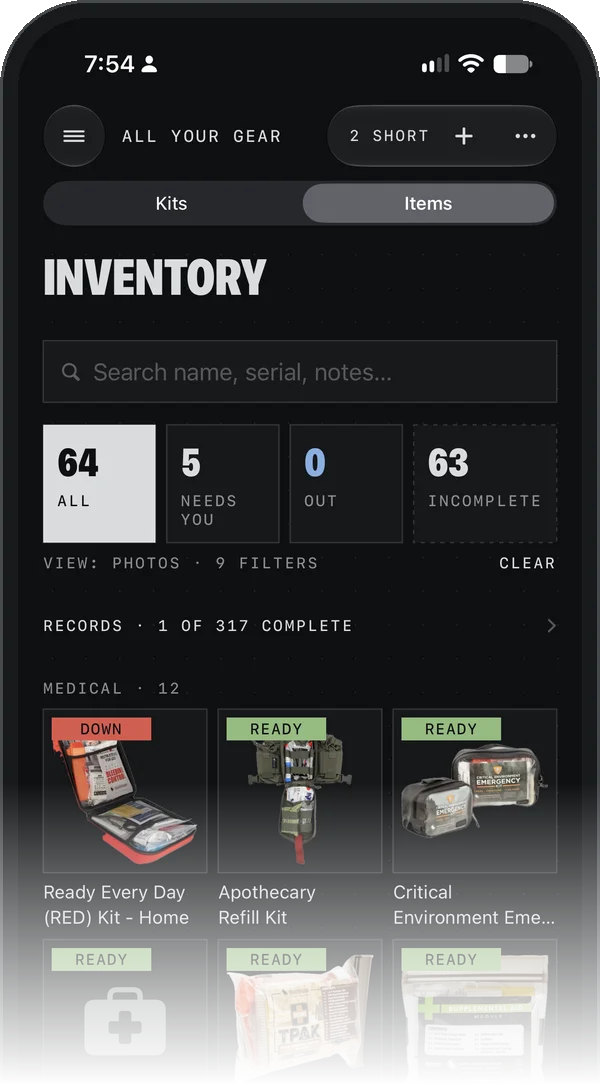
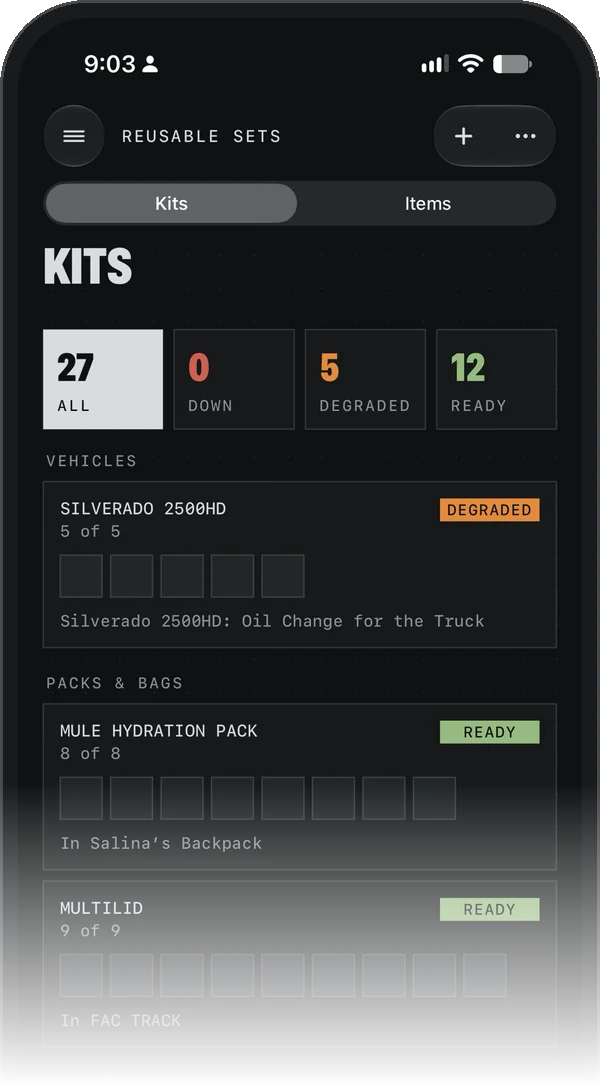
Group what you pack
A kit is gear that lives together, keeping items that depend on each other in one place, such as a fire kit with a ferro rod and magnesium. Build it once and reuse it.
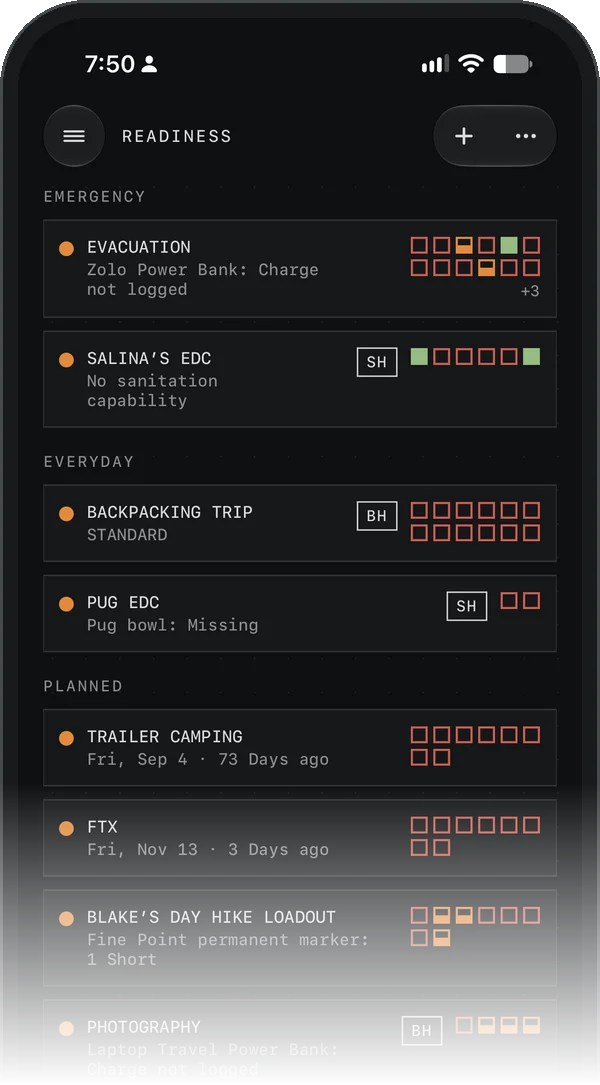
Build the scenario
Start with what you’re preparing for; that’s your scenario. Like a one-night summer campout, or a three-day power outage in the winter. A loadout is the set of gear that answers it, and you fill it with your kits and single items. Each thing it needs gets a slot. Mark the slots you can’t go without as critical, so the app knows a missing tourniquet matters more than a missing spare strap.
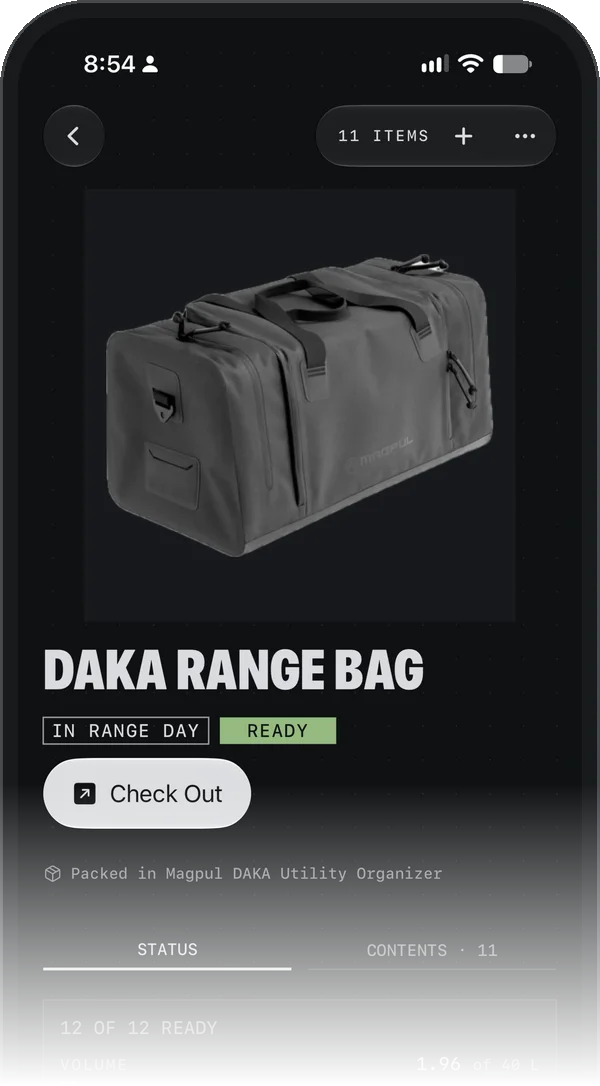
Check before you go
Loadout reads every item and tells you ready, degraded, out, or down, and gives the reason.
Loadout works out what’s ready, so you don’t have to.
You never type a status. Loadout reads the facts on each item and works out the answer for the whole scenario, and counts the gear you can’t go without for more.
Presence
Is it there?
Expiration
Is it in date?
Charge
Does it hold a charge?
Condition
Does it work?
Checked out
Does someone have it?
Open tasks
Is something waiting on a fix?
A missing shackle and a missing tourniquet aren’t the same problem. A slot you marked critical counts for more than an optional one.
Water Purification Tablets: 2 short · none recorded
First Aid Kit: Expires in 3 weeks
What Loadout looks at on your gear
Is this ready to take out?
Capability gaps
Tag what a scenario has to cover, like shelter, water and fire. Loadout tells you which ones the bag provides, and what's missing.
Readiness board
Every scenario reads ready, degraded, down, or out on one board, before you open anything.
Expiration and condition
Dates, charge and wear are read from each item. You get a reminder ahead of the date.
Weight and volume
Recorded per item and added up per kit and scenario as you build.
Checked out
See what is out, who has it, and which scenarios that leaves short.
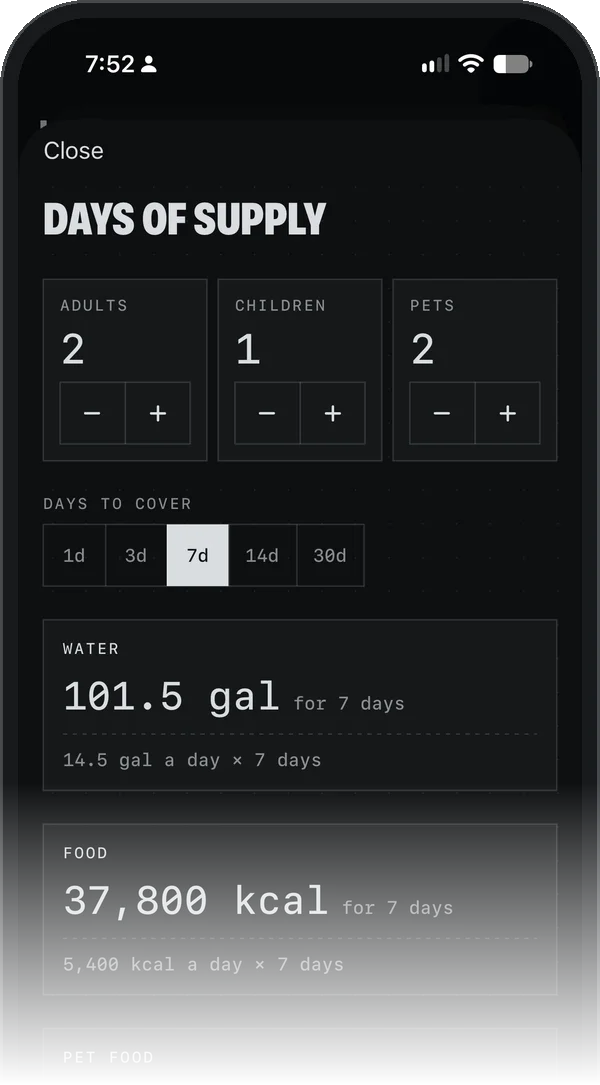
Days of supply
Set who you’re covering, people and pets, and how many days. Loadout works out the water, food and pet food that takes.
On your devices
iPhone, iPad, Mac and Apple Vision Pro sync through your own iCloud, and Apple Watch gets its data from your iPhone. It keeps working regardless of signal.
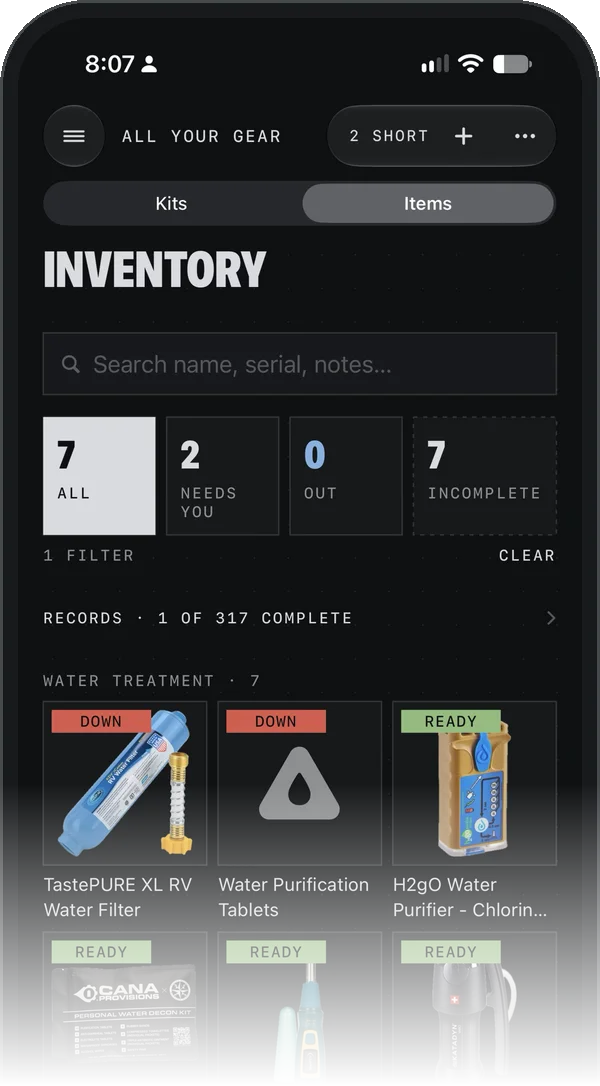
Every item lives
in one place.
An item lives in your inventory once, and kits and scenarios point at it instead of holding a copy. Take the filter out of the day pack and every scenario that needed it knows. So does everyone in your household.

Megan checked out Water Filter.
Water filter
Inventory · 1 on hand
Checked out by Megan, Friday
Needed in 3 scenarios
Household alerts are optional. You can turn them off.
Built for people who use their gear.
Nine communities, one app, and the same question in all of them. Is this ready to take out?
No LAST-MINUTE QUESTIONING, "Did i remember the radio? Poncho? extra batteries?"
You decide what syncs.
Every field has its own setting. Keep a serial number on this device and a paired Apple Watch, and let the rest sync through your own iCloud. There’s no account to make and no server of ours in the middle.
No extra account
Loadout uses your existing iCloud storage, and we never see your records.
Export always works
It works no matter what you’ve paid. If a subscription lapses, you keep your records and can take them with you.
No signal needed
Everything is on your device. Sync catches up when you’re back online.
Also on Apple Watch and Apple Vision Pro
Check in from your wrist
You’re back at the truck with a wet tent in your arms, and your phone is at the bottom of a bag somewhere. Raise your wrist and check the trip in. Flag the one thing that came back broken and leave the rest alone until you're home warm and dry. Finish it on iPhone later.
Before you leave your front door, you can read the board and check a scenario out from the same place. Upkeep is there too, so it's easy to mark a job done while you’re still at the repair bench. Search looks up any item, kit or scenario. It only reads, so you can’t change a record by accident.
A window for every kit
Lay the first aid kit out on the table and open its window on device. Go through it piece by piece with both hands free. Open a kit or a scenario in its own window and put it next to your board, then open another for whatever you’re packing next.
What else Loadout does
Send someone your whole kit
It took you years to work out what goes in your comprehensive first aid kit. When a friend asks, send it to them. An item, a kit or a whole scenario goes out as a file, by AirDrop, Messages or anything else that carries a file.
They open it and get their own copy to change however they like, and nothing stays linked to yours. A scenario brings its loadouts with it. Serial numbers, anything you keep on this device only, where you store your gear and your trip history all stay out of the file. Photos go along only if you turn them on.
Start with a bag that’s already laid out
Pick a starter template like 72 Hour Go Bag, Two Night Weekend Campout, Drone Flight Day, or Parade Camera Field Kit. You get the items, kits, and scenarios already built, with everything marked as Zero On Hand, so the app can show you what you need to add, and you can accurately update it with what you do have.
A missing serial number doesn’t mean a broken radio
Loadout answers two important questions separately. Is your gear ready to use? Have you finished filling in an item's record? A radio with no serial written down still works, and the app marks it as ready.
Service dates that come around on their own
Set a piece of gear to be serviced every six months or once a year. When the date gets close, you get a reminder. If it passes, the scenario that depends on that gear reads Degraded instead of Ready, until the task is done.
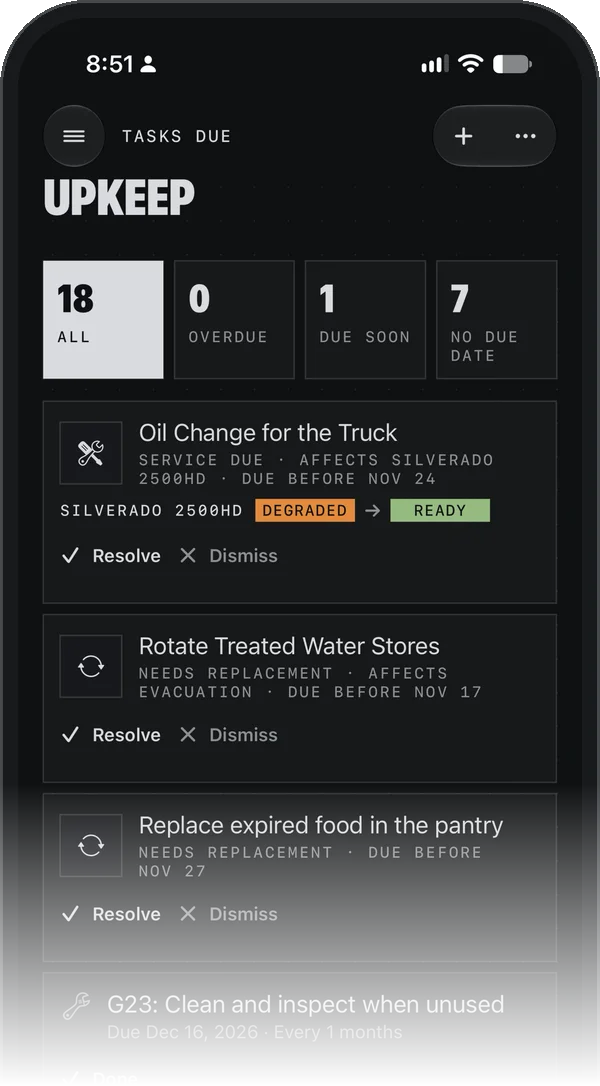
See your status without opening the app
Widgets show how a scenario stands, and every scenario tells the worst first, or what’s due in Upkeep. One of them checks a scenario out, and back in when you get home.
Say you’re back
Say “I’m back in Loadout" and the check-in starts. Ask “Where is my gear in Loadout” when you can’t find something. In Shortcuts, you can check gear out or in, mark service done, record a battery charge, or start a checklist.
Lay it out and take a picture
Lay your gear out on a table and take one photo. The app finds each piece and lists it for you to review. Photograph a receipt and it reads what you bought, after removing your card details and prices. It also reads serial numbers off the gear. Every photo is saved with the background removed. Photo and receipt reading work on supported devices.
Put a tag on the bag
Stick an NFC tag on the go bag or the camera case and write it from the app on iPhone. Scan it with Scan Tag or a Shortcuts automation to check the bag out, check it in or open it. The tag holds a code and no gear details, so anyone else who scans it learns nothing about what’s inside.
Write the steps down once
Some jobs have an order to them, like packing the truck or going over a drone before you head out. Write the steps once and run them whenever you need them, or automate them to come up when you check a scenario out.
Take a list on paper
Print what’s in a scenario on letter-size paper, with a checkbox beside each item. It’s useful when the bags are in the driveway and you want to tick things off with a pen. You can also add it to the Notes app.
Keep your own copy
Back everything up to a file you keep wherever you like, with or without photos. Restoring adds what’s in the backup and updates matching records, and it never deletes anything on the device. Fields you keep on one device stay out of the backup. Protected fields that sync to iCloud are saved in it as plain text, so keep the file somewhere you trust.
Everyone who carries the gear should be able to see it.
Your data stays yours
Your records sit on your devices and in your own iCloud. You can export them any time.
Readiness is worked out
Nobody types a status. The app works it out from facts and shows its reasons.
We ask what came back
A record of what came back and what didn’t is what keeps a kit accurate.
Help us test it before launch.
It’s a real build in late testing on iPhone, iPad, Mac, Apple Watch and Apple Vision Pro. We’re looking for people who will put it on their own gear and tell us what breaks. Testing starts this week and runs until launch.
It takes a couple of minutes. If you’re picked, Apple emails you a TestFlight invite.
Questions, answered plainly.
Do I need an account?
No. There’s no account to make. Loadout uses your existing iCloud storage.
Does it work without signal?
Yes. Everything’s on the device by default. Sync and sharing need an internet connection and an active iCloud account.
Is my data used for anything?
No. The app has no analytics and no telemetry, so there’s no data reported back to use.
Can two people share gear?
Yes. Share through iCloud with anyone who has an Apple ID. Everyone sees the same inventory, and check-out shows who has what. Households are part of Loadout Pro after launch. Everyone who joins needs Pro, or Family Sharing of a Pro purchase.
What isn’t in this version?
Barcode scanning and metric units. Those come later.